The system

Six systems. One account.

Most agencies run a CRM, a licensing spreadsheet, a training folder in Google Drive, a policy tracker somebody built in Excel, and a reporting habit of asking people how they did. Elite Life CRM is all six of those in one place, shaped around life insurance rather than bent to fit it.

System 01

AI Sales System

An eleven stage sales pipeline with the follow up already written, plus AI that works it while you are on another call.

  • Speed to lead the moment an opportunity is created
  • Missed call text back, so a missed call is not a lost one
  • Appointment confirmations and reminders timed to the appointment, not to signup
  • No show recovery that actually rebooks
  • Stale opportunity sweep, so nothing rots in stage four
  • A concierge that answers calls, texts and chat around the clock

Pipeline live AI agents in build

System 02

Licensing System

Fourteen stages from application to appointed. The single most expensive thing an agency loses track of, because an unlicensed recruit cannot write a thing.

  • Pre licensing course, exam, fingerprints, state application, carrier appointment
  • A chase sequence when a candidate stalls, so it is not on you to notice
  • Twenty four licensing fields on the opportunity, nineteen on the agent
  • Contract levels and codes as configuration, not as tribal knowledge
  • Work routes to your licensing coordinator by name

Pipeline live Team edition

System 03

Training System

Ten stages that take a newly licensed agent from onboarding to producing, so training is a pipeline you can see rather than a folder nobody opens.

  • New agent onboarding fires the day they are appointed
  • Every agent sits at a stage, so you can see who is stuck and where
  • Fourteen training fields on the opportunity
  • Promotion tracks tied to production counters, not to memory
  • Feeds the same reporting as everything else

Pipeline live Team edition

System 04

Client System

Thirteen stages of what happens after they say yes. Submitted, underwriting, approved, delivered, and the years of service that follow.

  • A real policy record, not a note on a contact
  • Beneficiaries and dependants are their own records, so six of them do not become six contacts and poison every list you have
  • Underwriting check ins while a case sits pending
  • Delivery, review request, birthdays and policy anniversaries
  • A ninety day nurture for the ones who did not buy yet

Pipeline live

System 05

Insurance Tools System

The parts a generic CRM has no concept of, because it was never built for people who sell insurance for a living.

  • Policy Lens, side by side illustration comparison built to be turned around and shown to a client
  • Guaranteed numbers flagged separately from assumed ones
  • Licence, CE, errors and omissions, and AML watched with escalating warnings
  • Consent checked before every send, in your contact's timezone
  • Your own do not call list, which always wins

Policy Lens live
Watch the two minute demo

System 06

Reporting System

The reason the other five are structured the way they are. Data entered as fields and stages can be counted. Data entered as notes cannot.

  • Pipeline by stage, by producer, by month
  • Licensing throughput, and where candidates actually stall
  • Training progress across the team
  • Policies issued, placed and delivered, with production counters per agent
  • Compliance status across every licensed person at once

In build

Agent use only

Intake forms that are actually built for a real case.

Four custom coded forms your agents run on the appointment. They are not CRM surveys, and the difference is not cosmetic.

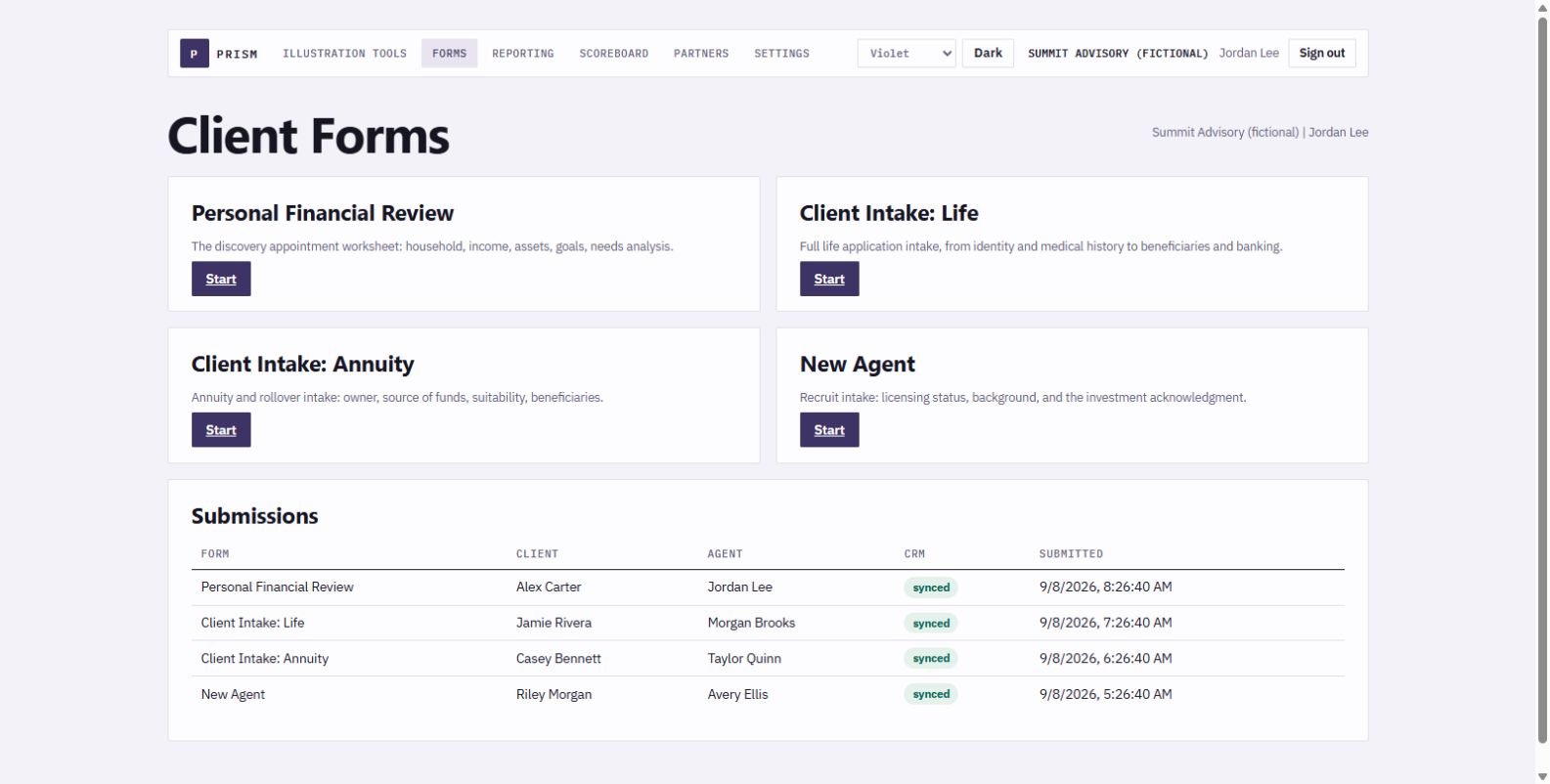
The agent forms hub showing four forms: Personal Financial Review, Client Intake Life Insurance, Client Intake Annuity or Rollover, and New Agent.
Four forms, one hub. Discovery, life application, annuity and rollover, and new agent recruiting.
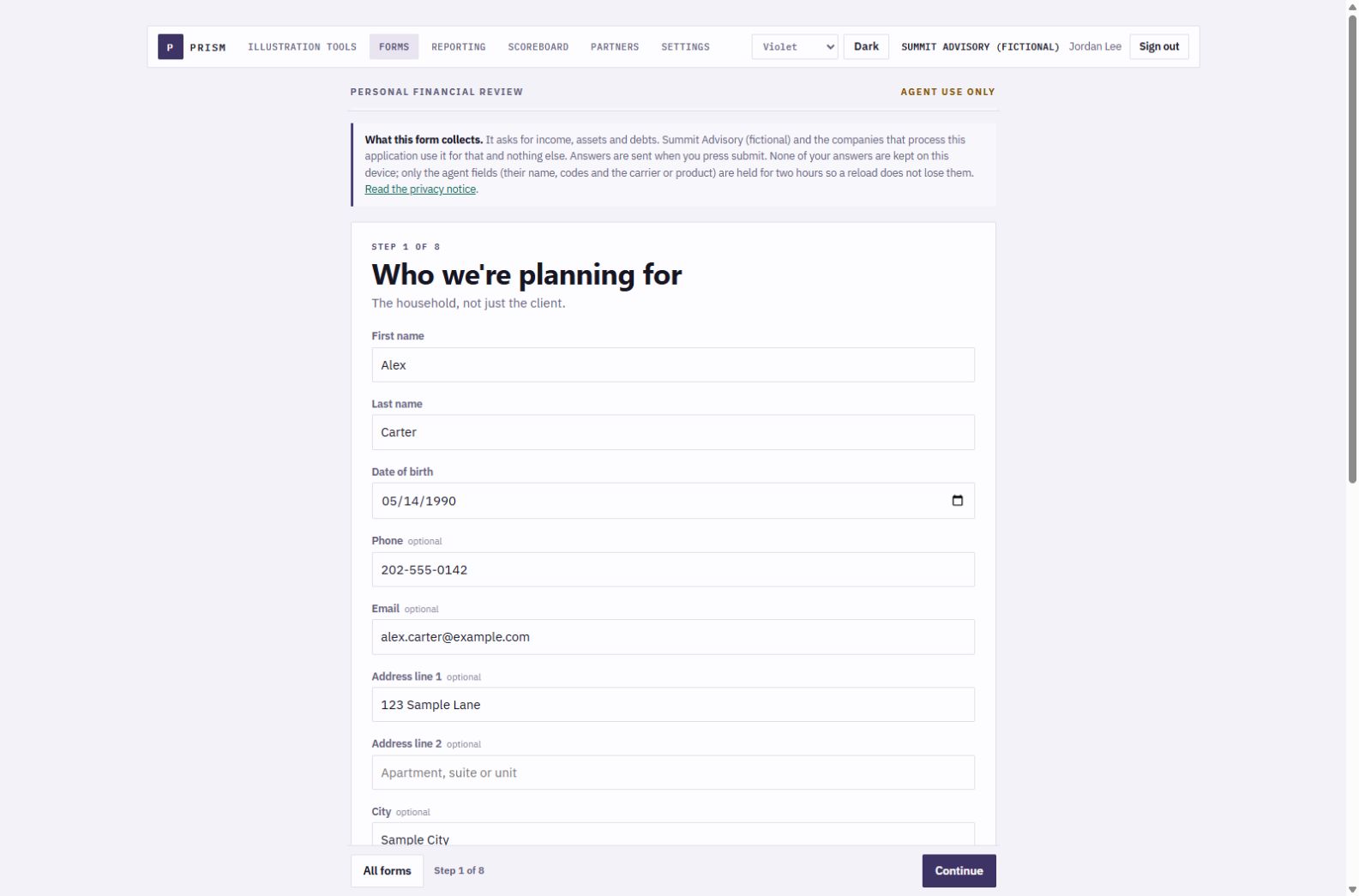
Personal Financial Review form, step 1 of 8, with a repeating group for children and dependants.
Stepped, and it remembers. Answers save on the device as you go, so a dropped call does not cost you the appointment.

Add as many as the case needs

A real household has five children, three existing policies and six beneficiaries. CRM surveys cannot repeat a field group, so they ship two hardcoded slots and a free-text box. These add a row when you need a row.

It writes the whole record

One submit creates the contact, the tags, the opportunity, the follow-up task and a full note. Repeating groups become real linked records: each policy and each beneficiary is its own object, associated to the client.

It PDFs the form

At the end your agent downloads the completed form as a PDF, every answer on it. A second PDF files itself on the contact in the CRM as the record that the form was completed, and when.

Versioned, not hand-clicked

Every CRM survey is built by hand, per account, and cannot be created by API. These are code. They deploy in one command and every change is diffable.

Agent facing, deliberately. These are not public lead forms. They are the tool your producer drives on the appointment, they carry a not-for-public-distribution notice, and answers stay on the device until submit.

And the two PDFs are not the same document, on purpose. The one your agent downloads holds every answer. The one filed in the CRM holds none of them: who, which form, when, and the consent wording with its timestamp. A CRM file attachment sits at a public link, and these forms collect social security and bank details, so the copy that lives at a link is the copy that says nothing. The answers stay on the contact record, behind your login.
Built and running

Bring your own AI

Connect it to Claude or ChatGPT.

Every CRM now ships an assistant you are stuck with. This one has an MCP endpoint, the open standard both Claude and ChatGPT use to connect to outside systems. So you point the model you already pay for at your own account, and it works on your real records rather than on a demo.

Claude

Add your CRM as a connector, then ask in plain English. Who is stuck in underwriting, what to say to the eleven people who went quiet, draft this month's licensing update.

ChatGPT

The same endpoint, the same account, a different model. If your team already lives in ChatGPT, they do not have to learn a second assistant.

It reads and it writes

Contacts, conversations, opportunities, pipelines, calendars and appointments. Not a chatbot that answers questions about your CRM, one that works in it.

Writes ask first

Anything that changes a record comes back for approval before it runs. Reading is free, writing is deliberate.

Your model, your bill

You connect the Claude or ChatGPT subscription you already pay for. We do not resell you tokens or meter your questions.

Why this matters more than it sounds. A built in assistant is only ever as good as the vendor's last release, and you cannot swap it. An open endpoint means the day a better model ships, you point at it. Your data never leaves your CRM either way.

Live

Where the build actually is

Said here rather than on a setup call after you have paid.

PieceState
Four pipelines, 48 stagesBuilt and running
191 fields in 10 foldersBuilt and running
Policy record and beneficiary recordsBuilt and running
Policy LensBuilt and running
Agent intake forms, all fourBuilt and running
Automation library, 28 workflowsBuilt, switched on per account
Compliance watch: licence, CE, E&O, AMLBuilt and running
AI agentsIn build
Reporting SystemIn build
Claude and ChatGPT connection (MCP)Built and running

Early access accounts are set up in order, and you will be told exactly what is live on your account before money moves.